
Article Archive: Patrick Nohe – Cipher Suites

Every once and a while you run into an article on the internet that’s just too good to just make a bookmark (or some similar technique that allows you to store the URL to that previous piece of useful information). I have been on the internet long enough to know that no matter how good an article might be, just wait long enough and it will be gone, some day… So I decided to store these kinds of articles right here, on my own website, in what I call the Article Archive.

At my work, one of the things I do is install certificates on webservers, no big deal, but I tend to want to understand what I’m doing, what certificates are doing, how TLS is making the connection to my bank secure. And I don’t settle for “by using cryptography”. Patrick Nohe wrote this wonderfully complete breakdown of what a cipher suite actually is and what new things TLSv1.3 is bringing us. Let’s dive in!

Original: https://www.thesslstore.com/blog/cipher-suites-algorithms-security-settings/

Cipher Suites: Ciphers, Algorithms and Negotiating Security Settings

SSL/TLS Cipher suites determine the parameters of an HTTPS connection. And they’ve just undergone a facelift.

If you interact with SSL/TLS and HTTPS encryption long enough, you’re eventually going to come across the term “cipher suite.” And while that sounds like a fancy nickname for Alan Turing’s hotel room, cipher suites play a critical role in every HTTPS connection you make on the internet.

So, what are encryption ciphers? And what are cipher suites?

What is a cipher suite?

Ciphers are algorithms, more specifically they’re a set of steps for performing a cryptographic function – it can be encryption, decryption, hashing or digital signatures. Nowadays ciphers are dependent upon the advanced processing capabilities of computers. That hasn’t always been the case though. One of the first, well-known historical ciphers belonged to Caesar – the very first emperor of Rome and purveyor of fancy appetizer salads – who used it to communicate with his generals during military operations.

Over the years, ciphers have become more complex, but the logic behind them has stayed the same. Whether it was Caesar crossing the Rubicon, the infamous Enigma cipher of World War II or some of the algorithms of today—the idea has always been to encode or encipher a message in such a way that only the intended party can read it.

Today we’re going to discuss SSL/TLS Cipher Suites – groups of ciphers that help secure an HTTPS connection – then go over their various parts and finish by looking at what’s changed between TLS 1.2 and TLS 1.3.

Let’s hash it out.

Cipher Suites – Some Background

As we just covered, a cipher is really just an algorithm, or a set of steps that are used to perform a specific mathematical function – be that encryption, hashing or digital signatures. Ciphers have always had a basis in math, even Caesar’s primitive shift cipher required counting forward a designated number of spaces in the alphabet to encrypt something.

I’m going to use Caesar’s cipher to explain some basic concepts that will be useful later when we get into modern cipher suites. The piece of data or information – it’s all digital now, though historically there’s typically been some kind of ink and paper/parchment involved. Anyway, that original unencrypted piece of data would be referred to as the plaintext, as it’s easily readable in its raw form. After the encryption process has been performed, it becomes a piece of ciphertext and should ideally be unreadable to anyone without the private key.

Keys vs. Algorithms

Encryption is performed by keys, but it’s important to square how keys and algorithms/ciphers fit together.

The algorithm or cipher used is just that, it’s a sequence of steps that must be used to encrypt the plaintext.

Depending on the cryptosytem, either the values within that algorithm, or the value the algorithm arrives at itself, are the keys.

We’ll clarify that point in a minute, just think of it this way: the algorithms are the general principles/rules used by a given cryptosystem, the keys are what actually performs the function.

It’s just Math

Sometimes it’s best to illustrate with an example so let’s go back to Caesar’s cipher and illustrate. In Caesar’s cipher, the actual algorithm is:

caesar cipher formula

Ok, now let’s take a closer look at each component.

Variable Description
x x represents the raw input, in this case x refers to whatever letter we’re shifting
e(x) e(x) represents the encrypted value
k k represents the key
mod mod represents the modulus

In Caesar’s cipher, the key is simply the number of spaces you decide to shift the letters. So, in the example below the key would be 3. We’re shifting everything three spaces forward.
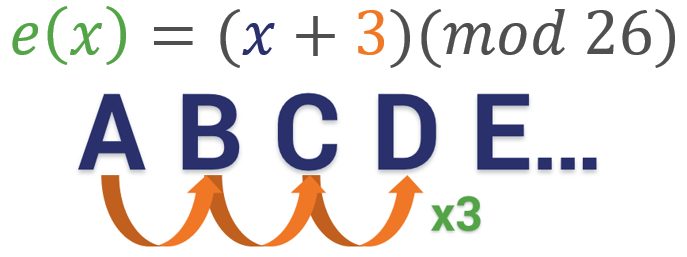
Caesar cipher at work

Now let’s add in the modulus. Modular arithmetic wraps around after it reaches the modulus, which is basically the end of the line, the number cap – however you want to think about it. With the alphabet, the modulus is obviously 26. There are 26 letters, so if you want to move a “Y” three spaces forward you have to wrap around and start back at 1 (or A) again. So in this instance, the equation would be B = (Y + 3)(mod 26).
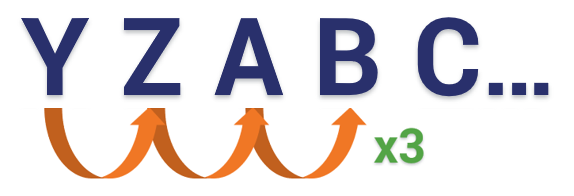
Reacharound from Z to A

Modern Ciphers & Cipher Suites

It’s no different at the digital level. The math is far more complicated now – no human could do it efficiently – but the concept is still the same. It’s all just math. Now let’s apply what we learned about algorithms in general to SSL/TLS and HTTPS connections.

Modern Cipher Suites

An HTTPS connection is actually a fairly complicated process. Last week we took a deep dive on the TLS handshake. This is the process where a client and server agree on a mutually support cipher suite and then use the chosen cipher suite to negotiate a secure connection.

Part of what makes the handshake so complicated is that it leverages several different cryptographic functions to achieve the HTTPS connection. During the handshake, the client and server will use:

  • A key exchange algorithm
  • A bulk encryption cipher
  • A digital signature scheme
  • A Hash/MAC function

These ciphers all work together at various points to perform authentication, key generation and exchange and a check-sum to ensure integrity.

In order to determine what specific algorithms to use, the client and server start by deciding on a cipher suite to use. Cipher suites are collections of these algorithms that can work together to perform the handshake and the encryption/decryption that follows. At the outset of the connection both parties share a list of supported cipher suites and then decide on the most secure, mutually supported suite.

The math is more complicated now… but the underlying concepts are still the same. It’s all just math.

There are 37 TLS 1.2 ciphers and five TLS 1.3 ciphers. Understanding their different parts is key to understanding HTTPS connections and SSL/TLS itself. Let’s start with an overview of TLS 1.2 – as it’s still the more common version of the protocol – and then we’ll talk about what’s improved in TLS 1.3.

What is a TLS 1.2 Cipher Suite?

As we covered in the last section, a Cipher Suite is a combination of algorithms used to negotiate security settings during the SSL/TLS handshake. When the ClientHello and ServerHello messages are exchanged the client sends a prioritized list of cipher suites it supports. The server then responds with the cipher suite it has selected from the list.

Cipher suites are named combinations of:

  • Key Exchange Algorithms (RSA, DH, ECDH, DHE, ECDHE, PSK)
  • Authentication/Digital Signature Algorithm (RSA, ECDSA, DSA)
  • Bulk Encryption Algorithms (AES, CHACHA20, Camellia, ARIA)
  • Message Authentication Code Algorithms (SHA-256, POLY1305)

So, for instance, here’s an example of a cipher suite:

TLS_ECDHE_RSA_WITH_AES_128_GCM_SHA256

I’ve color-coated it to help you distinguish between the ciphers.

TLS is the protocol. Starting with ECDHE we can see that during the handshake the keys will be exchanged via ephemeral Elliptic Curve Diffie Hellman (ECDHE). RSA is the authentication algorithm. AES_128_GCM is the bulk encryption algorithm: AES running Galois Counter Mode with 128-bit key size. Finally, SHA-256 is the hashing algorithm.

By the end of this article all of that will make sense.

During the TLS 1.2 handshake it’s going to play out like this:

  1. Client and Server determine a mutually supported cipher suite
  2. Server sends its certificate and public key
  3. Client authenticates the certificate & digital signature
  4. Key exchange functions are performed to generate symmetric session keys
  5. Encryption begins; HMAC is used to ensure the handshake wasn’t tampered with

Obviously, that’s incredibly condensed, if you’re interested check out the full TLS Handshake article, but hopefully you can see where each cipher/algorithm comes into the picture.

Taking a Closer Look at the SSL/TLS Handshake

In Everything Encryption By Patrick Nohe

There’s a lot going on underneath the hood when you connect to a website via HTTPS. First and foremost, everyone needs to… shake hands?!

Read more

Unfortunately, TLS 1.2 has 37 different cipher suites to choose from and not all of them are still considered secure. You may be wondering how you wind up with nearly 40 different cipher suites. It’s two-fold. For one, TLS 1.2 has been around about 10 years, meaning there’s been plenty of times for new algorithms to arrive and old ones to phase out. And as that happens, the IANA, the Internet Assigned Numbers Authority, the organization that administers all of this, has to keep creating new combinations of ciphers – new cipher suites – owing to the fact that four different algorithms are required and there are myriad possible combinations.

Of course, not all of the algorithms play nice together, but enough do that there are 37 approved TLS 1.2 cipher suites in use today.

Let’s dive a little deeper into the four different components of the TLS 1.2 cipher suite. But first let’s talk a little bit about the two different kinds of encryption that you see in SSL/TLS.

Two Kinds of Encryption

One of the biggest points of confusion when it comes to SSL/TLS centers around the types of encryption that are used. That has to do with how SSL certificates are advertised. And this really shouldn’t come as too much of a surprise given the fact the industry has never taken the time to correct everyone on the fact that we’re now using TLS certificates.

The 2048-bit key associated with your SSL certificate is used to help negotiate the HTTPS connection, but its role is actually a lot narrower than most people are led to believe. And 2048-bit keys are far from the only option when it comes to public key cryptosystems. ECDSA uses much smaller keys to accomplish a similar function.

We just seem to be fixated on the 2048-bit private key because it sounds more impressive. And we can trot out the, “it would take over a quadrillion years for a modern computer to crack this key and we’ll all already be dead by then!

But, arguably, the bulk cipher and the symmetric key you end up using DURING the connection are equally, if not more important than the public/private key pair.

Symmetric encryption involves two keys that are the same, or as the name quite cleverly implies, are symmetric. Both keys can perform both functions: encryption and decryption. This is the type of encryption that you’re actually using to communicate with the site you’re visiting.
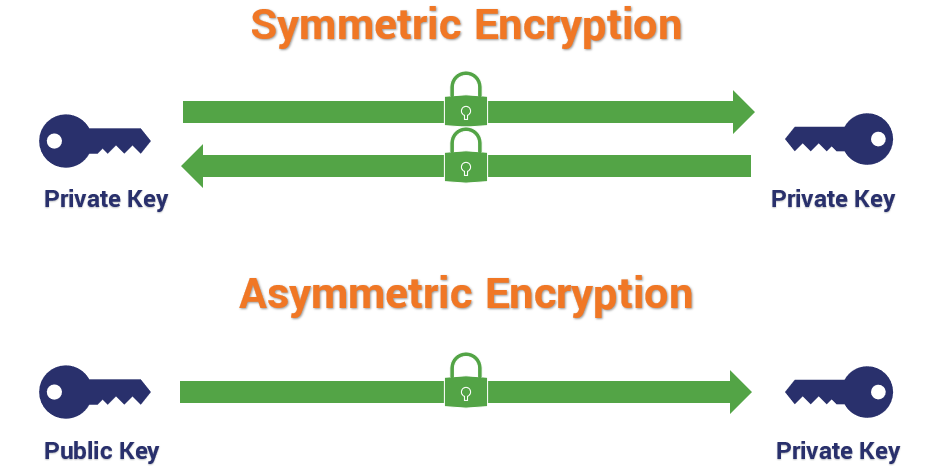
Two different encryption types

Conversely, with asymmetric encryption, you are talking about different keys with different abilities. When encryption is asymmetric, one key encrypts and the other key decrypts. Asymmetric encryption, which typically takes the form of RSA with TLS 1.2, is responsible for verifying digital signatures and, when RSA key exchange is in use, it’s for encrypting the pre-master secret that will be used to derive the symmetric session key. But RSA is not the only key exchange mechanism in use, so 2048-bit keys are actually kind of an odd thing to advertise.

Symmetric encryption keys, which are typically AES or Advanced Encryption Standard, range from 128-bit to 256-bit in key size. And this is completely efficient and secure for symmetric encryption, where computational hardness needs to go hand-in-hand with usability/performance.

How strong is 256-bit Encryption?

In Everything Encryption By Patrick Nohe

256-bit encryption strength gets tossed around all the time, but most people have no idea what 256 bits of security means or how strong it actually is. Let’s hash it out.

Read more

Those 2048-bit asymmetric RSA keys are expensive to compute with, and add latency to handshakes. They’re also vulnerable to padding attacks in some implementations.

Long story short, both asymmetric encryption and symmetric encryption are represented here, but the symmetric encryption is more relevant in the context of cipher suites.

Now let’s look at the four different components of a cipher suite.

Key Exchange

The first spot in the TLS 1.2 cipher suite is designated for the key exchange mechanism that will be used.

Key exchange refers to the actual process that’s used to transmit those symmetric session keys (or the key shares they’re derived from), but it’s not the only algorithm used in the generation process. That’s confusing, I know. The key exchange portion of the handshake determines the parameters for the key generation, but the hashing algorithm also plays a role in generating keys by providing Pseudo-Random Functions (PRFs), typically as a cryptographically secure pseudo-random number generator (CSPRNG).

The important thing to take away is that the key exchange mechanism that’s chosen isn’t solely responsible for generating the actual key.

RSA

RSA is named after the gentlemen that created it: Rivest, Shamir and Adleman. This is the most common asymmetric cryptosystem. It uses exponentiation of prime numbers and has a wide range of applications. With SSL/TLS you commonly see RSA used in the context of key exchange. Again, this is where all those 2048-bit (and 3072- and 4096-bit) keys come from.

Every handshake, regardless of whether or not RSA is chosen, begins with a Client and Server Hello where they exchanged randoms, a client random and a server random.

The way RSA operates is fairly simple, once the client and server decide to use a cipher suite that includes RSA key exchange – and after the client has authenticated the server:
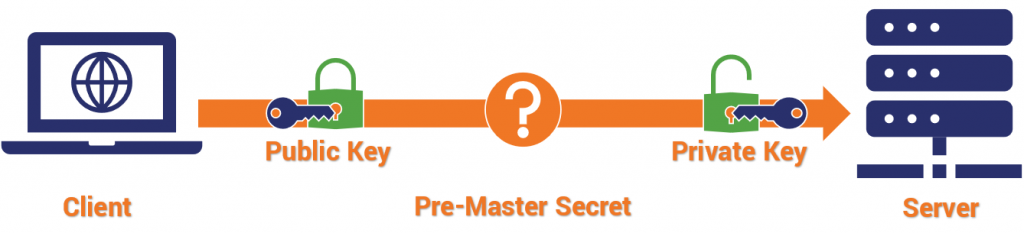
  1. The client uses the public key that the server sent over to encrypt a pre-master secret and transmit it.
  2. The server uses its private key to decrypt the pre-master secret.
  3. Both parties use PRFs, the client random, the server random and the pre-master secret to derive the master secret.
  4. Both parties use the master secret and more pseudo-random functions to calculate the session key.

It’s during those last two steps, 3 & 4, when mixing the master secret and deriving the session key, where the hashing algorithm’s pseudo-random functions are leveraged.

RSA key exchange has been useful for a long time, but it’s at the end of its life. TLS 1.3 has done away with RSA key exchange – in addition to all other static key exchange mechanisms – because of known vulnerabilities.

Diffie-Hellman & Elliptic Curve Diffie-Hellman

Named after Whitfield Diffie and Martin Hellman, this is a key exchange protocol, it’s NOT an asymmetric encryption protocol in the same vein as RSA though. The problem that Diffie and Hellman (using work inspired by Ralph Merkle) set out to solve was how to exchange a secure key over an unsecure network with an attacker watching.

What they came up with was Diffie-Hellman key exchange, which was eventually succeeded by RSA, but has now re-taken the advantage.

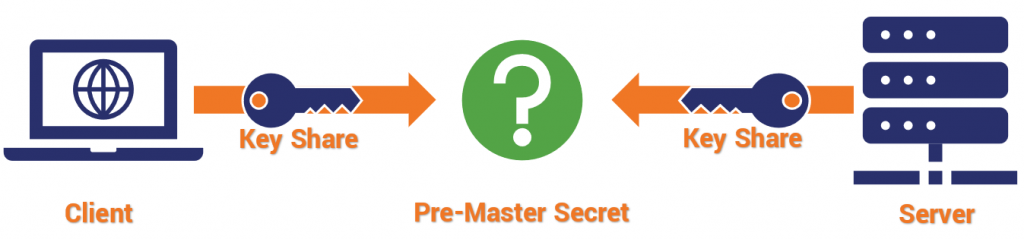
Diffie-Hellman key exchange works like this:
Diffie Hellman key exchange
  1. After exchanging randoms (g & p), both the client and server select their own pre-master secret (a & b, respectively) and compute a similar equation – ga mod p = A, & gb mod p = B.
  2. The value each arrived at (A & B) is sent to the other, and both parties repeat the same operation – Ba mod p, & Ab mod p.

Each party provides what is called a “key share,” and they each arrive independently at the shared session key. There is a rule of modular exponentiation that dictates this.
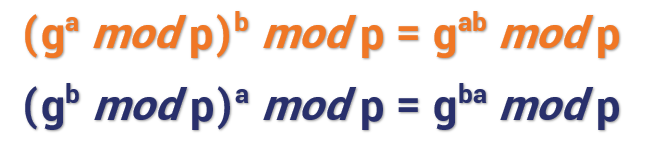
(ga mod p)b mod p = gab mod p
(gb mod p)a mod p = gba mod p

If that was a lot of math, the key takeaway is that: with Diffie-Hellman no asymmetric encryption actually takes place during the key exchange, rather the two parties mutually arrive at values that can be used to derive the session key.

Now let’s talk about Elliptic Curve Diffie-Hellman, which is basically just a modern-day iteration of Diffie-Hellman undergirded by elliptic curve cryptography as opposed to some other cryptosystem. Basically, it uses points plotted on an elliptic curve as the basis for its calculations.

There are a couple of things to keep in mind with Diffie-Hellman, first of all – it lacks a true authentication mechanism when being used ephemerally. Ephemeral keys are temporary and usually not authenticated.

Second, as we just mentioned, in TLS 1.3 all static key generation/exchange mechanisms were deprecated. That’s what basically killed RSA, and it also does away with DH schemes that aren’t ephemeral, too. ECDHE or Elliptic Curve Diffie-Hellman Ephemeral is now the standard for key exchange.

That’s because Perfect Forward Secrecy is mandatory in TLS 1.3. Perfect Forward Secrecy protects individual sessions from being decrypted, even in the event a certificate’s private key is compromised. Static key exchange schemes couldn’t support that. Ergo, they’re gone.

PSK

Typically written as TLS-PSK, this is a cipher that provides secure communication based on pre-shared symmetric keys exchanged between parties in advance. We’re not going to spend a lot of time on PSK as it’s fairly rare outside of highly regulated network environments and we definitely wouldn’t advice its commercial use. It was not included in TLS 1.3.

Digital Signature/Authentication

Here’s where things start to get confusing – and you can also begin to see how these cipher suites have multiple permutations. For example, there are four common iterations of Diffie-Hellman:

  • Diffie-Hellman (DH) *deprecated in TLS 1.3
  • Diffie-Hellman Ephemeral (DHE)
  • Elliptic Curve Diffie-Hellman (ECDH) *deprecated in TLS 1.3
  • Elliptic Curve Diffie-Hellman Ephemeral (ECDHE)

But none of those can handle authentication, so they have to be paired with an authentication scheme – historically, that’s been either DSA, RSA or ECDSA.

RSA can function as BOTH a key exchange mechanism, as well as provide authentication with digital signatures. You can even use Diffie-Hellman and RSA together. All these combinations and we’re not even halfway through the cipher suite.

The Signature algorithm is the second algorithm in the TLS 1.2 cipher suite.

One more thing, you sometimes people refer to the type of SSL certificate on the basis of its signing algorithm. For instance, when someone says they have an RSA SSL certificate or an Elliptic Curve SSL certificate, they’re alluding to the signing algorithm. That’s because this is determined during the generation of the CSR. Keep that in mind, because it’s part of why TLS 1.3 cipher suites don’t include the signing scheme.

RSA Digital Signatures

Digital Signatures

Digital Signatures are one of the best ways to authenticate another party. Using the digital signature, the client can verify the authenticity of the SSL/TLS certificate, and in the case of cipher suites using Diffie-Hellman, verify ownership of the public/private key pair.

With RSA, the client (and sometimes the server if a client SSL certificate is in use) checks the authenticity of the certificate being presented by running a series of checks. It looks at the certificate chain by following the digital signatures left by the signing CA back to one of the roots in its trust store. It checks the validity dates and the revocation status of the certificate, too. Then it uses the associated public key to verify the private key’s signature.

The final verification that the server is in possession of the private key comes during the key exchange, when the client encrypts the pre-master secret with the public key and the server decrypts it with private key.

Elliptic Curve Digital Signature Algorithm

Elliptic Curve Digital Signature Algorithm

As we mentioned earlier, Diffie-Hellman key exchange has no authentication mechanism in ephemeral mode. That means it needs to be paired with an authentication mechanism. As we just covered, RSA is an option, the other popular method is called the Elliptic Curve Digital Signature Algorithm, which has now replaced DSA. The way ECDSA works is very similar to RSA at the outset, but with one major difference.

Whereas both methods check the certificate the same way, when Diffie Hellman is in use the actual key exchange portion can’t be used to prove possession of the private key. Instead, the server takes the two randoms (client and server) as well as the Diffie-Hellman parameters it has chosen (its pre-master secret) and encrypts them all with its private key. This serves as its de facto digital signature. The client will use the public key to verify the signature and thus, ownership of the private key.

What about DSA?

The Digital Signature Algorithm, which was already on its way out, has been entirely removed from TLS 1.3. While there is some debate over how secure DSA still is, what really hamstrung it was key size. DSA uses keys that are comparable in size to RSA: 1024-, 2048-, 3096-bit keys, that – as we covered – are expensive to compute with. By comparison, it’s Elliptic Curve-based counterpart, ECDSA, uses keys that are typically 224- or 256-bit.

Edwards-curve Digital Signature Algorithm

EdDSA is a digital signature scheme that removes the need for pseudo-random number generation from the equation. We touched on PRFs earlier, they’re typically generated using the designated hash function, but they’re not always actually random. In fact, the secret values that are produced, which are sometimes called nonces, can leak private keys if the RNG is ever broken/made predictable.

Instead, EdDSA picks a nonce based on a hash of the private key and the message, which means after the private key is generated there’s no more need for random number generators. EdDSA is one of the three digital signature schemes approved for use in TLS 1.3.

Bulk Encryption Ciphers

While neither of the previous two categories are included in TLS 1.3 cipher suites, these next two – bulk ciphers and hashing algorithms – are included.

Your bulk cipher is what will be used for the actual symmetric encryption that will occur during an HTTPS connection. Traditionally there are two kinds of bulk cipher:

  • Block ciphers
  • Stream ciphers

A block cipher, as its name might suggest, encrypts data in blocks of a pre-determined size. Unlike with asymmetric encryption though, this isn’t necessarily linked to key size. A 256-bit key doesn’t always create 256-bit blocks of ciphertext. For instance, AES produces 128-bit blocks, regardless of key size.

At any rate, after data is encrypted into blocks, it’s then incumbent upon the recipient to decrypt the blocks and piece them back together so that the information is intelligible.

So, what happens if the data being encrypted isn’t exactly the right size? That’s extremely common. It means the data needs to be segmented into appropriately sized chunks, and any unfilled space needs to be padded with throwaway data to make it fit, which can open attack vectors and is just, generally, inefficient.

The other type of cipher is a stream cipher, which encrypts data in long pseudorandom streams. When you see the cipher written out, the bulk cipher is the third algorithm listed and it typically includes a modifier that dictates how the bulk cipher should be run.

For instance, in the example above we’re running AES or Advanced Encryption Standard, running in GCM or Galois Counter Mode, using 256-bit keys. AES is, by design, a block cipher. But it can be run as a stream cipher in counter mode.

We’ll get to it in a second, but in TLS 1.3, the bulk cipher is now expected to be an AEAD or Authenticated Encryption with Associated Data algorithm, meaning that it can not only encrypt the communication but also authenticate it. Originally these two functions had been performed separately, but issues with errors, and just difficulty implementing it correctly in general, motivated the IETF to combine the two functions in TLS 1.3.

We’ll get into the authentication portion of the AEAD when we discuss hashing algorithms in the next section.

AES

Rounds of encryption

Advanced Encryption Standard, a.k.a. Rijndael, is a NIST-approved encryption cipher with a block size of 128 bits, and symmetric keys with lengths of either 128, 192 or 256 bits. It’s actually the first and only publicly available cipher that’s approved by the NSA to encrypt “Top Secret” data. AES was the successor to the Data Encryption Standard, which was first published in 1977.

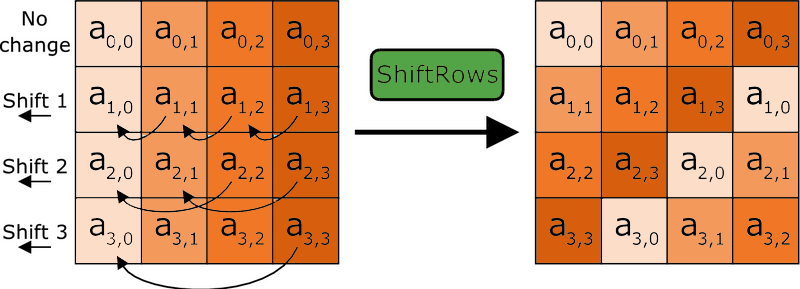
AES works in an interesting way. It operates on 4 x 4 arrays of bites called a “state.” As we just said, AES is naturally a block cipher and its blocks are 128 bits. It’s key sizes actually refer to the number of “rounds” that the plaintext will be put through as it’s encrypted.

  • 128-bit key = 10 Rounds
  • 192-bit key = 12 Rounds
  • 256-bit key = 14 Rounds

Each round the plaintext undergoes includes substitutions from a lookup table, rows shifted cyclically and a linear mixing operation that combines the four bytes in each column. For decryption a set of reverse rounds is used.
AES is the most commonly supported bulk cipher in TLS 1.2 & TLS 1.3 cipher suites. When run in Galois Counter Mode and CCM (Counter with CBC_MAC) mode, AES functions as a stream cipher with message authentication capabilities (an AEAD).

CBC just means that AES is being run in block cipher mode. I realize that may be confusing because we just discussed how block ciphers aren’t supported by TLS 1.3. With CCM, the counter mode means you’re running the cipher in stream mode, the CBC_MAC portion is for the message authentication part of the AEAD.

CHACHA20_POLY1305

CHACHA20_POLY1305 is a relatively new option for SSL/TLS, having been finalized in 2015. It’s a stream cipher that works alongside POLY1305, which works as an authenticator to accomplish AEAD. CHACHA is much faster than AES in software-only implementations. It’s about 3 times faster on platforms that don’t have specialized AES hardware. Both CHACHA and POLY1305 are considered easy to implement and provide excellent performance.

CHACHA20_POLY1305 uses a 256-bit key and a 96-bit nonce. During the encryption/authentication process, a one-time POLY1305 key is generated from the 256-bit key and the nonce. CHACHA20 then performs its encryption, using the same key and nonce. Finally, POLY1305 authenticates the message. The output is a piece of ciphertext the same length as the plaintext that was input, as well as a 128-bit MAC tag.

POLY1305 can also be used as a hashing algorithm on its own.

Other Bulk Ciphers

Here are some ill-advised SSL ciphers from handshakes past.

DES/Triple DES

The Data Encryption Standard, originally nicknamed Lucifer, was the first publicly available civilian block cipher. The version of DES we know today is a revised version of the original. DES is more notable for what it inspired than what it actually does. It’s encryption, by today’s standards, is fairly pedestrian with block sizes of 64 bits and a key size of 56 bits. Those key sizes were already considered worrisome as early as the 1970s, but by 1998 the EFF had demonstrated a special-purpose machine designed just to break DES and that was pretty much the final nail in its coffin.

Triple DES is an extension of DES that triple-encrypts each block with either two or three different keys. This still is sufficient for many regulatory bodies though. NIST, for instance, only allows Triple DES in its three-key version. And even at that, 3DES only provides 112 bits of security.

RC4

Ron’s Code 4 or Rivest Cipher 4 – it’s known by both names – invented by RSA’s Ron Rivest, is impressive for its speed and simplicity. It is no longer, however, impressive for its security, which has been shown to be wanting across multiple vulnerabilities. Originally a trade secret, it was leaked in September 1994 to a mailing list and then cracked within days.

Though it was originally recommended as a workaround for the BEAST attacks back in 2011, by 2013 new attacks demonstrated that it would be feasible to break RC4-encrypted TLS. Improvements to the attacks in 2015 made it even more viable and within months RC4 had been deprecated. RC4 has two successors in RC5 & RC6, neither is acceptable for TLS 1.3.

Camellia

A symmetric key block cipher with similar capabilities and key sizes to AES. It was developed in Japan by NTT and Mitsubishi and is approved by the ISO/IEC, EU and the Japanese CRYPTREC project. As of now, in its full implementation Camellia has not been broke. While there were Camellia TLS 1.2 cipher suites, it’s not included in TLS 1.3.

ARIA

Another block cipher that is similar to AES, ARIA was developed by a group of researchers in South Korea in 2003. Like AES, its key sizes refer to the number of rounds that occur during encryption. Like Camellia, it is also not included in TLS 1.3.

Data Integrity/Authentication

Not to be confused with server/client authentication, the hashing algorithm that has traditionally been associated with SSL/TLS has historically handled message authentication and pseudo-random functions. As we’ll discuss in just a moment, that’s been rethought for TLS 1.3, with HKMF or HMAC-based key derivation function.

Let’s start with TLS 1.2 and the Hash-Based Message Authentication Code which has traditionally appeared as the fourth algorithm in the cipher suite.

Hash-Based Message Authentication Code (HMAC)

This is a type of message authentication that uses cryptographic hashes to both authenticate a message and ensure data integrity. Historically this has been done by two main cipher families: MD5 and SHA.

HMAC

MD5 is totally outmoded now. It was once a highly used hash function that produced 128-bit digests or hash values. When you hash something, you’re mapping data of any length to a fixed-length output. In order for a hashing algorithm to be considered secure, it has to be resistant to collisions. A collision occurs when two disparate inputs create the same value. This renders the algorithm useless. MD5 was found to be embarrassingly insecure around 2012. Collisions can be found trivially on a home computer within seconds.

SHA replaced MD5 and has served adequately ever since. In 2016 the entire SSL/TLS industry shifted away from SHA-1 as the standard hashing algorithm and upgraded to SHA-2. Google managed to create a SHA-1 collision later that year. SHA-2 is still considered a secure hashing algorithm and is included in TLS 1.3. It just plays a different role.

AEAD vs HMAC

With a traditional HMAC, the message is hashed along with a secret key or Message Authentication Code, we’ll get into HMAC in-depth in the future, the important takeaway is that the hash function basically serves as a check-sum, arriving alongside the ciphertext and indicating whether the message was tampered with. The recipient will use the same key to run the same hash function and compare values.

Historically there has been three different approaches to this:

  • Encrypt-then-MAC
  • MAC-then-Encrypt
  • MAC-and-Encrypt

SSL/TLS, perhaps foolishly, has always used a Mac-then-Encrypt approach for message authentication. Or, more accurately, a MAC-then-Pad-then-Encrypt model. This has been problematic because it opens itself up to padding oracle attacks. It’s also somewhat inefficient, because the client or server have to use resources to decrypt the message first, which is wasteful if it can’t be authenticated. Attackers can actually send a bunch of unauthenticated requests to a server and overwork it by making it decrypt a bunch of garbage.

TLS 1.3 goes in a different direction with AEAD. It MACs and Encrypts simultaneously, shutting the window on padding attacks and saving clients and servers time and resources by making it easier for them to discard unauthenticated messages without having to decrypt them.  

HMAC-based Key Derivation Functions

Sticking with TLS 1.3, hashing has seen a bit of an overhaul. We just talked about AEAD bulk ciphers, the message authentication that had originally be handled by the HMAC algorithm, has been offloaded to the bulk cipher now.

Instead, focus on the last three words in HKDF: Key Derivation Function.

Let’s go back to the key exchange conversation we had earlier and the pseudo-random functions that were used to mix keys during RSA key exchange and calculate them during Diffie-Hellman. HKDF provides a much more secure, much more random method for deriving those keys.

There are two primary stages: extract and expand.

The extract portion takes key input information (key shares, randoms, pre-master secrets) and optionally a salt, and then extracts a sufficiently secure pseudorandom key.

The expand stage is a mechanism where the algorithm expands the key to requisite size without compromising its computational hardness. RFC 5869, which specifies HKDF makes it extremely clear that the two stages should not be conflated. As we’ve discussed many times, the Random Number Generators that get used for pseudo-random functions are much more fallible than many would care to admit. Especially if the same seeds are re-used by many different implementations. Hence TLS 1.3’s focus on increasing the security of its pseudo-random functions to avoid some of the vulnerabilities that have surfaced lately.

Obviously, this is an incomplete list, there are dozens of other ciphers. But this should at least give you some more context when you see the lists of cipher suites we have in the next section.

TLS 1.2 Cipher Suite List

Here’s a list of the current RECOMMENDED cipher suites for use with TLS 1.2. We’re not going to publish all 37 of the ciphers that are available. These are the ones that are advisable:

  • TLS_ECDHE_ECDSA_WITH_AES_128_GCM_SHA256
  • TLS_ECDHE_ECDSA_WITH_AES_256_GCM_SHA384
  • TLS_ECDHE_ECDSA_WITH_AES_128_CBC_SHA256
  • TLS_ECDHE_ECDSA_WITH_AES_256_CBC_SHA384
  • TLS_ECDHE_ECDSA_WITH_AES_128_CBC_SHA256
  • TLS_ECDHE_ECDSA_WITH_AES_256_CBC_SHA384
  • TLS_ECDHE_RSA_WITH_AES_128_GCM_SHA256
  • TLS_ECDHE_RSA_WITH_AES_256_GCM_SHA384
  • TLS_ECDHE_RSA_WITH_AES_128_CBC_SHA256
  • TLS_ECDHE_RSA_WITH_AES_256_CBC_SHA384
  • TLS_ECDHE_RSA_WITH_AES_128_CBC_SHA256
  • TLS_ECDHE_RSA_WITH_AES_256_CBC_SHA384
  • TLS_DHE_RSA_WITH_AES_128_GCM_SHA256
  • TLS_DHE_RSA_WITH_AES_256_GCM_SHA384
  • TLS_DHE_RSA_WITH_AES_128_CBC_SHA
  • TLS_DHE_RSA_WITH_AES_256_CBC_SHA
  • TLS_DHE_RSA_WITH_AES_128_CBC_SHA256
  • TLS_DHE_RSA_WITH_AES_256_CBC_SHA256
  • TLS_ECDHE_ECDSA_WITH_CHACHA20_POLY1305_SHA256
  • TLS_ECDHE_ECDSA_WITH_CHACHA20_POLY1305
  • TLS_ECDHE_RSA_WITH_CHACHA20_POLY1305_SHA256
  • TLS_ECDHE_RSA_WITH_CHACHA20_POLY1305

Again, you should be using Ephemeral Diffie-Hellman. Not only is it mandatory in TLS 1.3, it also facilitates Perfect Forward Secrecy, which guards against the decryption of individual sessions in the even the server’s private key is ever compromised.

What’s Different in TLS 1.3?

We’ve tried to point out when things have changed during each section, but we’ll go ahead an give a more comprehensive list here. Let’s start with the makeup of the cipher suite itself, then we’ll go back over the ways that the algorithms themselves have been updated for TLS 1.3 cipher suites.

Shorter Cipher Suites

The biggest thing you’ll notice about TLS 1.3 cipher suites is that they’re much shorter than their TLS 1.2 counterparts. That’s owing to two major things:

  1. The type of certificate is no longer listed (whether its RSA or ECDSA)
  2. They key exchange mechanism is not listed (always DHE or ECDHE)

That means that the number of negotiations that need to be done when determining encryption parameters has been reduced from four to two.

As you can see, TLS 1.3 cipher suites only include an AEAD bulk cipher and an HKDF.

The client goes into the handshake with the knowledge that Diffie-Hellman Ephemeral scheme will be used for the key exchange process. This means it can send its portion of the key share during the Client Hello.

That, in turn, can cut the TLS 1.3 handshake down to a single roundtrip, where the server responds with all the requisite information for the two parties to derive the session key and begin communicating securely during its Server Hello message.  

Deprecation of Old Ciphers/Functionality

But the changes go well beyond just the length of the cipher suites and the reduced number of negotiations during the handshake. Things have also been made much more secure.

TLS 1.3 has eliminated:

TLS 1.3 removed these ciphers
  • SSL Compression
  • Static key exchange functions
  • Block ciphers (CBC)
  • Non-AEAD ciphers (MAC-then-Encrypt)
  • Renegotiation of encryption parameters

It’s also dropped support for older, vulnerable SSL ciphers like:

  • RC4
  • DSA
  • MD5
  • SHA1
  • Weak Elliptic Curves
  • RSA Key Exchange
  • Static Diffie-Hellman (DH, ECDH)

Because the structure of 1.3 cipher suites is different from its predecessors’, TLS 1.3 cipher suites will not be interchangeable with older TLS versions. That essentially means you’re going to need to have two different implementations if you plan on continuing to support TLS 1.2. And there’s nothing wrong with continuing to support TLS 1.2, either.

Until more companies in the hosting community make it a point to transition to TLS 1.3, shutting off TLS 1.2 would be foolish.

You should have already disabled TLS 1.1, TLS 1.0, SSL 3.0 and SSL 2.0 though. The PCI DSS deadline for deprecating SSL 3.0 was last Summer. The deadline for TLS 1.0 and TLS 1.1 is January 2020.

TLS 1.3 Cipher Suite List

Here are the five TLS 1.3 cipher suites that are supported by OpenSSL right now.

  • TLS_AES_256_GCM_SHA384
  • TLS_CHACHA20_POLY1305_SHA256
  • TLS_AES_128_GCM_SHA256
  • TLS_AES_128_CCM_8_SHA256
  • TLS_AES_128_CCM_SHA256

There may be more cipher suites incoming as TLS 1.3 continues to gain its footing, but reducing the number of possible options was also one of the biggest considerations when the IETF was finalizing TLS 1.3, so if there are additional cipher suites added don’t expect the explosion of combinations we saw with the TLS 1.2.

What We Hashed Out (For the Skimmers)

For those that like to skim, here are the key takeaways from today’s conversation:

  • Ciphers are algorithms, sets of instructions for performing cryptographic functions like encrypting, decrypting, hashing and signing. They can be symmetric or asymmetric, depending on the type of encryption they support.
  • A Cipher Suite is a combination of ciphers used to negotiate security settings during the SSL/TLS handshake. During the handshake, the client and server exchange a prioritized list of Cipher Suites and decide on the suite that is best supported by both.
  • TLS 1.3 the structure of Cipher Suites has changed, shrinking from four ciphers to just two and cutting then number of negotiations in half.

Article Archive: Mark Nottingham – Caching Tutorial

Every once and a while you run into an article on the internet that’s just too good to just make a bookmark (or some similar technique that allows you to store the URL to that previous piece of useful information). I have been on the internet long enough to know that no matter how good an article might be, just wait long enough and it will be gone, some day… So I decided to store these kinds of articles right here, on my own website, in what I call the Article Archive.

This is the first of suchs articles; in which Mark Nottingham dives deep into the realm of caching.

Original: https://www.mnot.net/cache_docs/

Caching Tutorial

for Web Authors and Webmasters

This is an informational document. Although technical in nature, it attempts to make the concepts involved understandable and applicable in real-world situations. Because of this, some aspects of the material are simplified or omitted, for the sake of clarity. If you are interested in the minutia of the subject, please explore the References and Further Information at the end.

  1. What’s a Web Cache? Why do people use them?
  2. Kinds of Web Caches
    1. Browser Caches
    2. Proxy Caches
  3. Aren’t Web Caches bad for me? Why should I help them?
  4. How Web Caches Work
  5. How (and how not) to Control Caches
    1. HTML Meta Tags vs. HTTP Headers
    2. Pragma HTTP Headers (and why they don’t work)
    3. Controlling Freshness with the Expires HTTP Header
    4. Cache-Control HTTP Headers
    5. Validators and Validation
  6. Tips for Building a Cache-Aware Site
  7. Writing Cache-Aware Scripts
  8. Frequently Asked Questions
  9. Implementation Notes — Web Servers
  10. Implementation Notes — Server-Side Scripting
  11. References and Further Information
  12. About This Document

What’s a Web Cache? Why do people use them?

A Web cache sits between one or more Web servers (also known as origin servers) and a client or many clients, and watches requests come by, saving copies of the responses — like HTML pages, images and files (collectively known as representations) — for itself. Then, if there is another request for the same URL, it can use the response that it has, instead of asking the origin server for it again.

There are two main reasons that Web caches are used:

  • To reduce latency — Because the request is satisfied from the cache (which is closer to the client) instead of the origin server, it takes less time for it to get the representation and display it. This makes the Web seem more responsive.
  • To reduce network traffic — Because representations are reused, it reduces the amount of bandwidth used by a client. This saves money if the client is paying for traffic, and keeps their bandwidth requirements lower and more manageable.

Kinds of Web Caches

Browser Caches

If you examine the preferences dialog of any modern Web browser (like Internet Explorer, Safari or Mozilla), you’ll probably notice a “cache” setting. This lets you set aside a section of your computer’s hard disk to store representations that you’ve seen, just for you. The browser cache works according to fairly simple rules. It will check to make sure that the representations are fresh, usually once a session (that is, the once in the current invocation of the browser).

This cache is especially useful when users hit the “back” button or click a link to see a page they’ve just looked at. Also, if you use the same navigation images throughout your site, they’ll be served from browsers’ caches almost instantaneously.

Proxy Caches

Web proxy caches work on the same principle, but a much larger scale. Proxies serve hundreds or thousands of users in the same way; large corporations and ISPs often set them up on their firewalls, or as standalone devices (also known as intermediaries).

Because proxy caches aren’t part of the client or the origin server, but instead are out on the network, requests have to be routed to them somehow. One way to do this is to use your browser’s proxy setting to manually tell it what proxy to use; another is using interception. Interception proxies have Web requests redirected to them by the underlying network itself, so that clients don’t need to be configured for them, or even know about them.

Proxy caches are a type of shared cache; rather than just having one person using them, they usually have a large number of users, and because of this they are very good at reducing latency and network traffic. That’s because popular representations are reused a number of times.

Gateway Caches

Also known as “reverse proxy caches” or “surrogate caches,” gateway caches are also intermediaries, but instead of being deployed by network administrators to save bandwidth, they’re typically deployed by Webmasters themselves, to make their sites more scalable, reliable and better performing.

Requests can be routed to gateway caches by a number of methods, but typically some form of load balancer is used to make one or more of them look like the origin server to clients.

Content delivery networks (CDNs) distribute gateway caches throughout the Internet (or a part of it) and sell caching to interested Web sites. Speedera and Akamai are examples of CDNs.

This tutorial focuses mostly on browser and proxy caches, although some of the information is suitable for those interested in gateway caches as well.

Aren’t Web Caches bad for me? Why should I help them?

Web caching is one of the most misunderstood technologies on the Internet. Webmasters in particular fear losing control of their site, because a proxy cache can “hide” their users from them, making it difficult to see who’s using the site.

Unfortunately for them, even if Web caches didn’t exist, there are too many variables on the Internet to assure that they’ll be able to get an accurate picture of how users see their site. If this is a big concern for you, this tutorial will teach you how to get the statistics you need without making your site cache-unfriendly.

Another concern is that caches can serve content that is out of date, or stale. However, this tutorial can show you how to configure your server to control how your content is cached.

CDNs are an interesting development, because unlike many proxy caches, their gateway caches are aligned with the interests of the Web site being cached, so that these problems aren’t seen. However, even when you use a CDN, you still have to consider that there will be proxy and browser caches downstream.

On the other hand, if you plan your site well, caches can help your Web site load faster, and save load on your server and Internet link. The difference can be dramatic; a site that is difficult to cache may take several seconds to load, while one that takes advantage of caching can seem instantaneous in comparison. Users will appreciate a fast-loading site, and will visit more often.

Think of it this way; many large Internet companies are spending millions of dollars setting up farms of servers around the world to replicate their content, in order to make it as fast to access as possible for their users. Caches do the same for you, and they’re even closer to the end user. Best of all, you don’t have to pay for them.

The fact is that proxy and browser caches will be used whether you like it or not. If you don’t configure your site to be cached correctly, it will be cached using whatever defaults the cache’s administrator decides upon.

How Web Caches Work

All caches have a set of rules that they use to determine when to serve a representation from the cache, if it’s available. Some of these rules are set in the protocols (HTTP 1.0 and 1.1), and some are set by the administrator of the cache (either the user of the browser cache, or the proxy administrator).

Generally speaking, these are the most common rules that are followed (don’t worry if you don’t understand the details, it will be explained below):

  1. If the response’s headers tell the cache not to keep it, it won’t.
  2. If the request is authenticated or secure (i.e., HTTPS), it won’t be cached by shared caches.
  3. A cached representation is considered fresh (that is, able to be sent to a client without checking with the origin server) if:
    • It has an expiry time or other age-controlling header set, and is still within the fresh period, or
    • If the cache has seen the representation recently, and it was modified relatively long ago.
    Fresh representations are served directly from the cache, without checking with the origin server.
  4. If a representation is stale, the origin server will be asked to validate it, or tell the cache whether the copy that it has is still good.
  5. Under certain circumstances — for example, when it’s disconnected from a network — a cache can serve stale responses without checking with the origin server.

If no validator (an ETag or Last-Modified header) is present on a response, and it doesn’t have any explicit freshness information, it will usually — but not always — be considered uncacheable.

Together, freshness and validation are the most important ways that a cache works with content. A fresh representation will be available instantly from the cache, while a validated representation will avoid sending the entire representation over again if it hasn’t changed.

How (and how not) to Control Caches

There are several tools that Web designers and Webmasters can use to fine-tune how caches will treat their sites. It may require getting your hands a little dirty with your server’s configuration, but the results are worth it. For details on how to use these tools with your server, see the Implementation sections below.

HTML Meta Tags and HTTP Headers

HTML authors can put tags in a document’s <HEAD> section that describe its attributes. These meta tags are often used in the belief that they can mark a document as uncacheable, or expire it at a certain time.

Meta tags are easy to use, but aren’t very effective. That’s because they’re only honored by a few browser caches, not proxy caches (which almost never read the HTML in the document). While it may be tempting to put a Pragma: no-cache meta tag into a Web page, it won’t necessarily cause it to be kept fresh.

If your site is hosted at an ISP or hosting farm and they don’t give you the ability to set arbitrary HTTP headers (like Expires and Cache-Control), complain loudly; these are tools necessary for doing your job.

On the other hand, true HTTP headers give you a lot of control over how both browser caches and proxies handle your representations. They can’t be seen in the HTML, and are usually automatically generated by the Web server. However, you can control them to some degree, depending on the server you use. In the following sections, you’ll see what HTTP headers are interesting, and how to apply them to your site.

HTTP headers are sent by the server before the HTML, and only seen by the browser and any intermediate caches. Typical HTTP 1.1 response headers might look like this:

HTTP/1.1 200 OK
Date: Fri, 30 Oct 1998 13:19:41 GMT
Server: Apache/1.3.3 (Unix)
Cache-Control: max-age=3600, must-revalidate
Expires: Fri, 30 Oct 1998 14:19:41 GMT
Last-Modified: Mon, 29 Jun 1998 02:28:12 GMT
ETag: "3e86-410-3596fbbc"
Content-Length: 1040
Content-Type: text/html

The HTML would follow these headers, separated by a blank line. See the Implementation sections for information about how to set HTTP headers.

Pragma HTTP Headers (and why they don’t work)

Many people believe that assigning a Pragma: no-cache HTTP header to a representation will make it uncacheable. This is not necessarily true; the HTTP specification does not set any guidelines for Pragma response headers; instead, Pragma request headers (the headers that a browser sends to a server) are discussed. Although a few caches may honor this header, the majority won’t, and it won’t have any effect. Use the headers below instead.

Controlling Freshness with the Expires HTTP Header

The Expires HTTP header is a basic means of controlling caches; it tells all caches how long the associated representation is fresh for. After that time, caches will always check back with the origin server to see if a document is changed. Expires headers are supported by practically every cache.

Most Web servers allow you to set Expires response headers in a number of ways. Commonly, they will allow setting an absolute time to expire, a time based on the last time that the client retrieved the representation (last access time), or a time based on the last time the document changed on your server (last modification time).

Expires headers are especially good for making static images (like navigation bars and buttons) cacheable. Because they don’t change much, you can set extremely long expiry time on them, making your site appear much more responsive to your users. They’re also useful for controlling caching of a page that is regularly changed. For instance, if you update a news page once a day at 6am, you can set the representation to expire at that time, so caches will know when to get a fresh copy, without users having to hit ‘reload’.

The only value valid in an Expires header is a HTTP date; anything else will most likely be interpreted as ‘in the past’, so that the representation is uncacheable. Also, remember that the time in a HTTP date is Greenwich Mean Time (GMT), not local time.

For example:

Expires: Fri, 30 Oct 1998 14:19:41 GMT

It’s important to make sure that your Web server’s clock is accurate if you use the Expires header. One way to do this is using the Network Time Protocol (NTP); talk to your local system administrator to find out more.

Although the Expires header is useful, it has some limitations. First, because there’s a date involved, the clocks on the Web server and the cache must be synchronised; if they have a different idea of the time, the intended results won’t be achieved, and caches might wrongly consider stale content as fresh.

Another problem with Expires is that it’s easy to forget that you’ve set some content to expire at a particular time. If you don’t update an Expires time before it passes, each and every request will go back to your Web server, increasing load and latency.

Cache-Control HTTP Headers

HTTP 1.1 introduced a new class of headers, Cache-Control response headers, to give Web publishers more control over their content, and to address the limitations of Expires.

Useful Cache-Control response headers include:

  • max-age=[seconds] — specifies the maximum amount of time that a representation will be considered fresh. Similar to Expires, this directive is relative to the time of the request, rather than absolute.

[seconds]

is the number of seconds from the time of the request you wish the representation to be fresh for. s-maxage=[seconds] — similar to max-age, except that it only applies to shared (e.g., proxy) caches. public — marks authenticated responses as cacheable; normally, if HTTP authentication is required, responses are automatically private. private — allows caches that are specific to one user (e.g., in a browser) to store the response; shared caches (e.g., in a proxy) may not. no-cache — forces caches to submit the request to the origin server for validation before releasing a cached copy, every time. This is useful to assure that authentication is respected (in combination with public), or to maintain rigid freshness, without sacrificing all of the benefits of caching. no-store — instructs caches not to keep a copy of the representation under any conditions. must-revalidate — tells caches that they must obey any freshness information you give them about a representation. HTTP allows caches to serve stale representations under special conditions; by specifying this header, you’re telling the cache that you want it to strictly follow your rules. proxy-revalidate — similar to must-revalidate, except that it only applies to proxy caches.

For example:

Cache-Control: max-age=3600, must-revalidate

When both Cache-Control and Expires are present, Cache-Control takes precedence. If you plan to use the Cache-Control headers, you should have a look at the excellent documentation in HTTP 1.1; see References and Further Information.

Validators and Validation

In How Web Caches Work, we said that validation is used by servers and caches to communicate when a representation has changed. By using it, caches avoid having to download the entire representation when they already have a copy locally, but they’re not sure if it’s still fresh.

Validators are very important; if one isn’t present, and there isn’t any freshness information (Expires or Cache-Control) available, caches will not store a representation at all.

The most common validator is the time that the document last changed, as communicated in Last-Modified header. When a cache has a representation stored that includes a Last-Modified header, it can use it to ask the server if the representation has changed since the last time it was seen, with an If-Modified-Since request.

HTTP 1.1 introduced a new kind of validator called the ETag. ETags are unique identifiers that are generated by the server and changed every time the representation does. Because the server controls how the ETag is generated, caches can be sure that if the ETag matches when they make a If-None-Match request, the representation really is the same.

Almost all caches use Last-Modified times as validators; ETag validation is also becoming prevalent.

Most modern Web servers will generate both ETag and Last-Modified headers to use as validators for static content (i.e., files) automatically; you won’t have to do anything. However, they don’t know enough about dynamic content (like CGI, ASP or database sites) to generate them; see Writing Cache-Aware Scripts.

Tips for Building a Cache-Aware Site

Besides using freshness information and validation, there are a number of other things you can do to make your site more cache-friendly.

  • Use URLs consistently — this is the golden rule of caching. If you serve the same content on different pages, to different users, or from different sites, it should use the same URL. This is the easiest and most effective way to make your site cache-friendly. For example, if you use “/index.html” in your HTML as a reference once, always use it that way.
  • Use a common library of images and other elements and refer back to them from different places.
  • Make caches store images and pages that don’t change often by using a Cache-Control: max-age header with a large value.
  • Make caches recognise regularly updated pages by specifying an appropriate max-age or expiration time.
  • If a resource (especially a downloadable file) changes, change its name. That way, you can make it expire far in the future, and still guarantee that the correct version is served; the page that links to it is the only one that will need a short expiry time.
  • Don’t change files unnecessarily. If you do, everything will have a falsely young Last-Modified date. For instance, when updating your site, don’t copy over the entire site; just move the files that you’ve changed.
  • Use cookies only where necessary — cookies are difficult to cache, and aren’t needed in most situations. If you must use a cookie, limit its use to dynamic pages.
  • Check your pages with REDbot — it can help you apply many of the concepts in this tutorial.

Writing Cache-Aware Scripts

By default, most scripts won’t return a validator (a Last-Modified or ETag response header) or freshness information (Expires or Cache-Control). While some scripts really are dynamic (meaning that they return a different response for every request), many (like search engines and database-driven sites) can benefit from being cache-friendly.

Generally speaking, if a script produces output that is reproducible with the same request at a later time (whether it be minutes or days later), it should be cacheable. If the content of the script changes only depending on what’s in the URL, it is cacheable; if the output depends on a cookie, authentication information or other external criteria, it probably isn’t.

  • The best way to make a script cache-friendly (as well as perform better) is to dump its content to a plain file whenever it changes. The Web server can then treat it like any other Web page, generating and using validators, which makes your life easier. Remember to only write files that have changed, so the Last-Modified times are preserved.
  • Another way to make a script cacheable in a limited fashion is to set an age-related header for as far in the future as practical. Although this can be done with Expires, it’s probably easiest to do so with Cache-Control: max-age, which will make the request fresh for an amount of time after the request.
  • If you can’t do that, you’ll need to make the script generate a validator, and then respond to If-Modified-Since and/or If-None-Match requests. This can be done by parsing the HTTP headers, and then responding with 304 Not Modified when appropriate. Unfortunately, this is not a trival task.

Some other tips;

  • Don’t use POST unless it’s appropriate. Responses to the POST method aren’t kept by most caches; if you send information in the path or query (via GET), caches can store that information for the future.
  • Don’t embed user-specific information in the URL unless the content generated is completely unique to that user.
  • Don’t count on all requests from a user coming from the same host, because caches often work together.
  • Generate Content-Length response headers. It’s easy to do, and it will allow the response of your script to be used in a persistent connection. This allows clients to request multiple representations on one TCP/IP connection, instead of setting up a connection for every request. It makes your site seem much faster.

See the Implementation Notes for more specific information.

Frequently Asked Questions

What are the most important things to make cacheable?

A good strategy is to identify the most popular, largest representations (especially images) and work with them first.

How can I make my pages as fast as possible with caches?

The most cacheable representation is one with a long freshness time set. Validation does help reduce the time that it takes to see a representation, but the cache still has to contact the origin server to see if it’s fresh. If the cache already knows it’s fresh, it will be served directly.

I understand that caching is good, but I need to keep statistics on how many people visit my page!

If you must know every time a page is accessed, select ONE small item on a page (or the page itself), and make it uncacheable, by giving it a suitable headers. For example, you could refer to a 1×1 transparent uncacheable image from each page. The Referer header will contain information about what page called it.

Be aware that even this will not give truly accurate statistics about your users, and is unfriendly to the Internet and your users; it generates unnecessary traffic, and forces people to wait for that uncached item to be downloaded. For more information about this, see On Interpreting Access Statistics in the references.

How can I see a representation’s HTTP headers?

Many Web browsers let you see the Expires and Last-Modified headers are in a “page info” or similar interface. If available, this will give you a menu of the page and any representations (like images) associated with it, along with their details.

To see the full headers of a representation, you can manually connect to the Web server using a Telnet client.

To do so, you may need to type the port (be default, 80) into a separate field, or you may need to connect to www.example.com:80 or www.example.com 80 (note the space). Consult your Telnet client’s documentation.

Once you’ve opened a connection to the site, type a request for the representation. For instance, if you want to see the headers for http://www.example.com/foo.html, connect to www.example.com, port 80, and type:

GET /foo.html HTTP/1.1 [return]
Host: www.example.com [return][return]

Press the Return key every time you see [return]; make sure to press it twice at the end. This will print the headers, and then the full representation. To see the headers only, substitute HEAD for GET.

My pages are password-protected; how do proxy caches deal with them?

By default, pages protected with HTTP authentication are considered private; they will not be kept by shared caches. However, you can make authenticated pages public with a Cache-Control: public header; HTTP 1.1-compliant caches will then allow them to be cached.

If you’d like such pages to be cacheable, but still authenticated for every user, combine the Cache-Control: public and no-cache headers. This tells the cache that it must submit the new client’s authentication information to the origin server before releasing the representation from the cache. This would look like:

Cache-Control: public, no-cache

Whether or not this is done, it’s best to minimize use of authentication; for example, if your images are not sensitive, put them in a separate directory and configure your server not to force authentication for it. That way, those images will be naturally cacheable.

Should I worry about security if people access my site through a cache?

https:// pages are not cached (or decrypted) by proxy caches, so you don’t have to worry about that. However, because caches store http:// responses and URLs fetched through them, you should be conscious about unsecured sites; an unscrupulous administrator could conceivably gather information about their users, especially in the URL.

In fact, any administrator on the network between your server and your clients could gather this type of information. One particular problem is when CGI scripts put usernames and passwords in the URL itself; this makes it trivial for others to find and use their login.

If you’re aware of the issues surrounding Web security in general, you shouldn’t have any surprises from proxy caches.

I’m looking for an integrated Web publishing solution. Which ones are cache-aware?

It varies. Generally speaking, the more complex a solution is, the more difficult it is to cache. The worst are ones which dynamically generate all content and don’t provide validators; they may not be cacheable at all. Speak with your vendor’s technical staff for more information, and see the Implementation notes below.

My images expire a month from now, but I need to change them in the caches now!

The Expires header can’t be circumvented; unless the cache (either browser or proxy) runs out of room and has to delete the representations, the cached copy will be used until then.

The most effective solution is to change any links to them; that way, completely new representations will be loaded fresh from the origin server. Remember that any page that refers to these representations will be cached as well. Because of this, it’s best to make static images and similar representations very cacheable, while keeping the HTML pages that refer to them on a tight leash.

If you want to reload a representation from a specific cache, you can either force a reload (in Firefox, holding down shift while pressing ‘reload’ will do this by issuing a Pragma: no-cache request header) while using the cache. Or, you can have the cache administrator delete the representation through their interface.

I run a Web Hosting service. How can I let my users publish cache-friendly pages?

If you’re using Apache, consider allowing them to use .htaccess files and providing appropriate documentation.

Otherwise, you can establish predetermined areas for various caching attributes in each virtual server. For instance, you could specify a directory /cache-1m that will be cached for one month after access, and a /no-cache area that will be served with headers instructing caches not to store representations from it.

Whatever you are able to do, it is best to work with your largest customers first on caching. Most of the savings (in bandwidth and in load on your servers) will be realized from high-volume sites.

I’ve marked my pages as cacheable, but my browser keeps requesting them on every request. How do I force the cache to keep representations of them?

Caches aren’t required to keep a representation and reuse it; they’re only required to not keep or use them under some conditions. All caches make decisions about which representations to keep based upon their size, type (e.g., image vs. html), or by how much space they have left to keep local copies. Yours may not be considered worth keeping around, compared to more popular or larger representations.

Some caches do allow their administrators to prioritize what kinds of representations are kept, and some allow representations to be “pinned” in cache, so that they’re always available.

Implementation Notes — Web Servers

Generally speaking, it’s best to use the latest version of whatever Web server you’ve chosen to deploy. Not only will they likely contain more cache-friendly features, new versions also usually have important security and performance improvements.

Apache HTTP Server

Apache uses optional modules to include headers, including both Expires and Cache-Control. Both modules are available in the 1.2 or greater distribution.

The modules need to be built into Apache; although they are included in the distribution, they are not turned on by default. To find out if the modules are enabled in your server, find the httpd binary and run httpd -l; this should print a list of the available modules (note that this only lists compiled-in modules; on later versions of Apache, use httpd -M to include dynamically loaded modules as well). The modules we’re looking for are expires_module and headers_module.

  • If they aren’t available, and you have administrative access, you can recompile Apache to include them. This can be done either by uncommenting the appropriate lines in the Configuration file, or using the -enable-module=expires and -enable-module=headers arguments to configure (1.3 or greater). Consult the INSTALL file found with the Apache distribution.

Once you have an Apache with the appropriate modules, you can use mod_expires to specify when representations should expire, either in .htaccess files or in the server’s access.conf file. You can specify expiry from either access or modification time, and apply it to a file type or as a default. See the module documentation for more information, and speak with your local Apache guru if you have trouble.

To apply Cache-Control headers, you’ll need to use the mod_headers module, which allows you to specify arbitrary HTTP headers for a resource. See the mod_headers documentation.

Here’s an example .htaccess file that demonstrates the use of some headers.

  • .htaccess files allow web publishers to use commands normally only found in configuration files. They affect the content of the directory they’re in and their subdirectories. Talk to your server administrator to find out if they’re enabled.
### activate mod_expires
ExpiresActive On
### Expire .gif's 1 month from when they're accessed
ExpiresByType image/gif A2592000
### Expire everything else 1 day from when it's last modified
### (this uses the Alternative syntax)
ExpiresDefault "modification plus 1 day"
### Apply a Cache-Control header to index.html
<Files index.html>
Header append Cache-Control "public, must-revalidate"
</Files>
  • Note that mod_expires automatically calculates and inserts a Cache-Control:max-age header as appropriate.

Apache 2’s configuration is very similar to that of 1.3; see the 2.2 mod_expires and mod_headers documentation for more information.

Microsoft IIS

Microsoft’s Internet Information Server makes it very easy to set headers in a somewhat flexible way. Note that this is only possible in version 4 of the server, which will run only on NT Server.

To specify headers for an area of a site, select it in the Administration Tools interface, and bring up its properties. After selecting the HTTP Headers tab, you should see two interesting areas; Enable Content Expiration and Custom HTTP headers. The first should be self-explanatory, and the second can be used to apply Cache-Control headers.

See the ASP section below for information about setting headers in Active Server Pages. It is also possible to set headers from ISAPI modules; refer to MSDN for details.

Netscape/iPlanet Enterprise Server

As of version 3.6, Enterprise Server does not provide any obvious way to set Expires headers. However, it has supported HTTP 1.1 features since version 3.0. This means that HTTP 1.1 caches (proxy and browser) will be able to take advantage of Cache-Control settings you make.

To use Cache-Control headers, choose Content Management | Cache Control Directives in the administration server. Then, using the Resource Picker, choose the directory where you want to set the headers. After setting the headers, click ‘OK’. For more information, see the NES manual.

Implementation Notes — Server-Side Scripting

One thing to keep in mind is that it may be easier to set HTTP headers with your Web server rather than in the scripting language. Try both.

Because the emphasis in server-side scripting is on dynamic content, it doesn’t make for very cacheable pages, even when the content could be cached. If your content changes often, but not on every page hit, consider setting a Cache-Control: max-age header; most users access pages again in a relatively short period of time. For instance, when users hit the ‘back’ button, if there isn’t any validator or freshness information available, they’ll have to wait until the page is re-downloaded from the server to see it.

CGI

CGI scripts are one of the most popular ways to generate content. You can easily append HTTP response headers by adding them before you send the body; Most CGI implementations already require you to do this for the Content-Type header. For instance, in Perl;

#!/usr/bin/perl
print "Content-type: text/html\n";
print "Expires: Thu, 29 Oct 1998 17:04:19 GMT\n";
print "\n";
### the content body follows...

Since it’s all text, you can easily generate Expires and other date-related headers with in-built functions. It’s even easier if you use Cache-Control: max-age;

print "Cache-Control: max-age=600\n";

This will make the script cacheable for 10 minutes after the request, so that if the user hits the ‘back’ button, they won’t be resubmitting the request.

The CGI specification also makes request headers that the client sends available in the environment of the script; each header has ‘HTTP_’ prepended to its name. So, if a client makes an If-Modified-Since request, it will show up as HTTP_IF_MODIFIED_SINCE.

Server Side Includes

SSI (often used with the extension .shtml) is one of the first ways that Web publishers were able to get dynamic content into pages. By using special tags in the pages, a limited form of in-HTML scripting was available.

Most implementations of SSI do not set validators, and as such are not cacheable. However, Apache’s implementation does allow users to specify which SSI files can be cached, by setting the group execute permissions on the appropriate files, combined with the XbitHack full directive. For more information, see the mod_include documentation.

PHP

PHP is a server-side scripting language that, when built into the server, can be used to embed scripts inside a page’s HTML, much like SSI, but with a far larger number of options. PHP can be used as a CGI script on any Web server (Unix or Windows), or as an Apache module.

By default, representations processed by PHP are not assigned validators, and are therefore uncacheable. However, developers can set HTTP headers by using the Header() function.

For example, this will create a Cache-Control header, as well as an Expires header three days in the future:

<?php
 Header("Cache-Control: must-revalidate");

 $offset = 60 * 60 * 24 * 3;
 $ExpStr = "Expires: " . gmdate("D, d M Y H:i:s", time() + $offset) . " GMT";
 Header($ExpStr);
?>

Remember that the Header() function MUST come before any other output.

As you can see, you’ll have to create the HTTP date for an Expires header by hand; PHP doesn’t provide a function to do it for you (although recent versions have made it easier; see the PHP’s date documentation). Of course, it’s easy to set a Cache-Control: max-age header, which is just as good for most situations.

For more information, see the manual entry for header.

Cold Fusion

Cold Fusion, by Macromedia is a commercial server-side scripting engine, with support for several Web servers on Windows, Linux and several flavors of Unix.

Cold Fusion makes setting arbitrary HTTP headers relatively easy, with the CFHEADER tag. Unfortunately, their example for setting an Expires header, as below, is a bit misleading.

<CFHEADER NAME="Expires" VALUE="#Now()#">

It doesn’t work like you might think, because the time (in this case, when the request is made) doesn’t get converted to a HTTP-valid date; instead, it just gets printed as a representation of Cold Fusion’s Date/Time object. Most clients will either ignore such a value, or convert it to a default, like January 1, 1970.

However, Cold Fusion does provide a date formatting function that will do the job; GetHttpTimeString. In combination with DateAdd, it’s easy to set Expires dates; here, we set a header to declare that representations of the page expire in one month;

<cfheader name="Expires" 
  value="#GetHttpTimeString(DateAdd('m', 1, Now()))#">

You can also use the CFHEADER tag to set Cache-Control: max-age and other headers.

Remember that Web server headers are passed through in some deployments of Cold Fusion (such as CGI); check yours to determine whether you can use this to your advantage, by setting headers on the server instead of in Cold Fusion.

ASP and ASP.NET

When setting HTTP headers from ASPs, make sure you either place the Response method calls before any HTML generation, or use Response.Buffer to buffer the output. Also, note that some versions of IIS set a Cache-Control: private header on ASPs by default, and must be declared public to be cacheable by shared caches.

Active Server Pages, built into IIS and also available for other Web servers, also allows you to set HTTP headers. For instance, to set an expiry time, you can use the properties of the Response object;

<% Response.Expires=1440 %>

specifying the number of minutes from the request to expire the representation. Cache-Control headers can be added like this:

<% Response.CacheControl="public" %>

In ASP.NET, Response.Expires is deprecated; the proper way to set cache-related headers is with Response.Cache;

Response.Cache.SetExpires ( DateTime.Now.AddMinutes ( 60 ) ) ;
Response.Cache.SetCacheability ( HttpCacheability.Public ) ;

References and Further Information

HTTP 1.1 Specification

The HTTP 1.1 spec has many extensions for making pages cacheable, and is the authoritative guide to implementing the protocol. See sections 13, 14.9, 14.21, and 14.25.

Web-Caching.com

An excellent introduction to caching concepts, with links to other online resources.

On Interpreting Access Statistics

Jeff Goldberg’s informative rant on why you shouldn’t rely on access statistics and hit counters.

REDbot

Examines HTTP resources to determine how they will interact with Web caches, and generally how well they use the protocol.

About This Document

This document is Copyright © 1998-2013 Mark Nottingham <mnot@mnot.net>. This work is licensed under a Creative Commons Attribution-Noncommercial-No Derivative Works 3.0 Unported License.

All trademarks within are property of their respective holders.

Although the author believes the contents to be accurate at the time of publication, no liability is assumed for them, their application or any consequences thereof. If any misrepresentations, errors or other need for clarification is found, please contact the author immediately.

The latest revision of this document can always be obtained from https://www.mnot.net/cache_docs/

Translations are available in: Chinese, Czech, German, and French.

25 October, 2017

Creative Commons License